The Advantages of Using Notepad
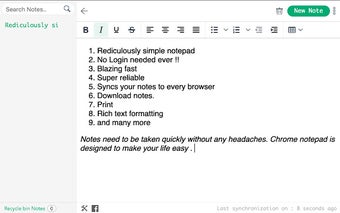
Notepad is an application to help write simple notes on a Web browser. This utility can be used for those people who do not need a particular text editor. You will be able to take notes in plain text and save them as a text file. This is a simple and practical application to help you do that. It supports all major browsers, including Chrome, Firefox, Internet Explorer, Safari, and Opera. It also can sync the contents with your other devices.
Top Recommended Alternative

The advantages of using Notepad are:
1. Write all kinds of information on your PC. You can keep track of all the ideas and thoughts that have been put into your head. It can be used as a personal diary.
2. Access your notes on all major browsers, including Chrome, Firefox, Internet Explorer, Safari, and Opera.
3. Synchronize the notes to any device.You will not have to worry about the lost contents. All your notes can be accessed from any location.
4. Add your fonts. You can save the fonts in the form of a .font file, and you can choose to use them with your text.
5. Set the number of lines per page. You can use the app as a basic text editor or as an app that can sync the contents with your other devices.
6. Add a background to your pages. You can make the text more appealing by adding a background to your pages.
7. You can change the color of the text.